Each iOS and iPadOS let customers simply share Wi-Fi passwords between Apple gadgets. Nonetheless, generally folks must see the password of a recognized Wi-Fi community to share it with non-Apple gadgets. Now with iOS 16 and iPadOS 16, Apple has lastly added an choice to let customers rapidly view saved Wi-Fi community passwords on the iPhone and iPad. Learn on as we element how to do that in your system.
Dropped at you by Mosyle, the one Apple Unified Platform. Mosyle absolutely integrates 5 completely different functions on a single Apple-only platform. Companies can routinely deploy, handle, and shield all their Apple gadgets. Request a FREE account to learn to put your Apple fleet on auto-pilot at a value level that’s onerous to imagine.
The right way to discover saved Wi-Fi passwords in your iPhone and iPad
Whereas Mac customers have all the time been in a position to simply view saved Wi-Fi passwords, iPhone and iPad customers have by no means had such an choice till now. Fortunately, iOS 16 and iPadOS 16 let customers test the password of a recognized Wi-Fi community with just some fast steps.
Right here’s precisely what you should do:
- Open the Settings app in your system.
- Select the Wi-Fi menu.
- Faucet the Extra Information button subsequent to the Wi-Fi community within the checklist.
- Faucet the Password area and authenticate with Face ID or Contact ID.
After following these steps, you’ll have the ability to see the password for that Wi-Fi community. You may then merely enter it on one other system, and even copy it to the clipboard proper from there. However what if you wish to test the password of a Wi-Fi community that you realize however are out of vary?
Fortunately, there’s additionally a option to just do that with iOS 16 and iPadOS 16. After coming into the Wi-Fi menu within the Settings app, faucet the Edit button. Then, after authenticating with Face ID or Contact ID, you’ll discover a checklist with all of your recognized Wi-Fi networks. Faucet the Extra Information button after which faucet the Passwords area, similar to you probably did earlier than.
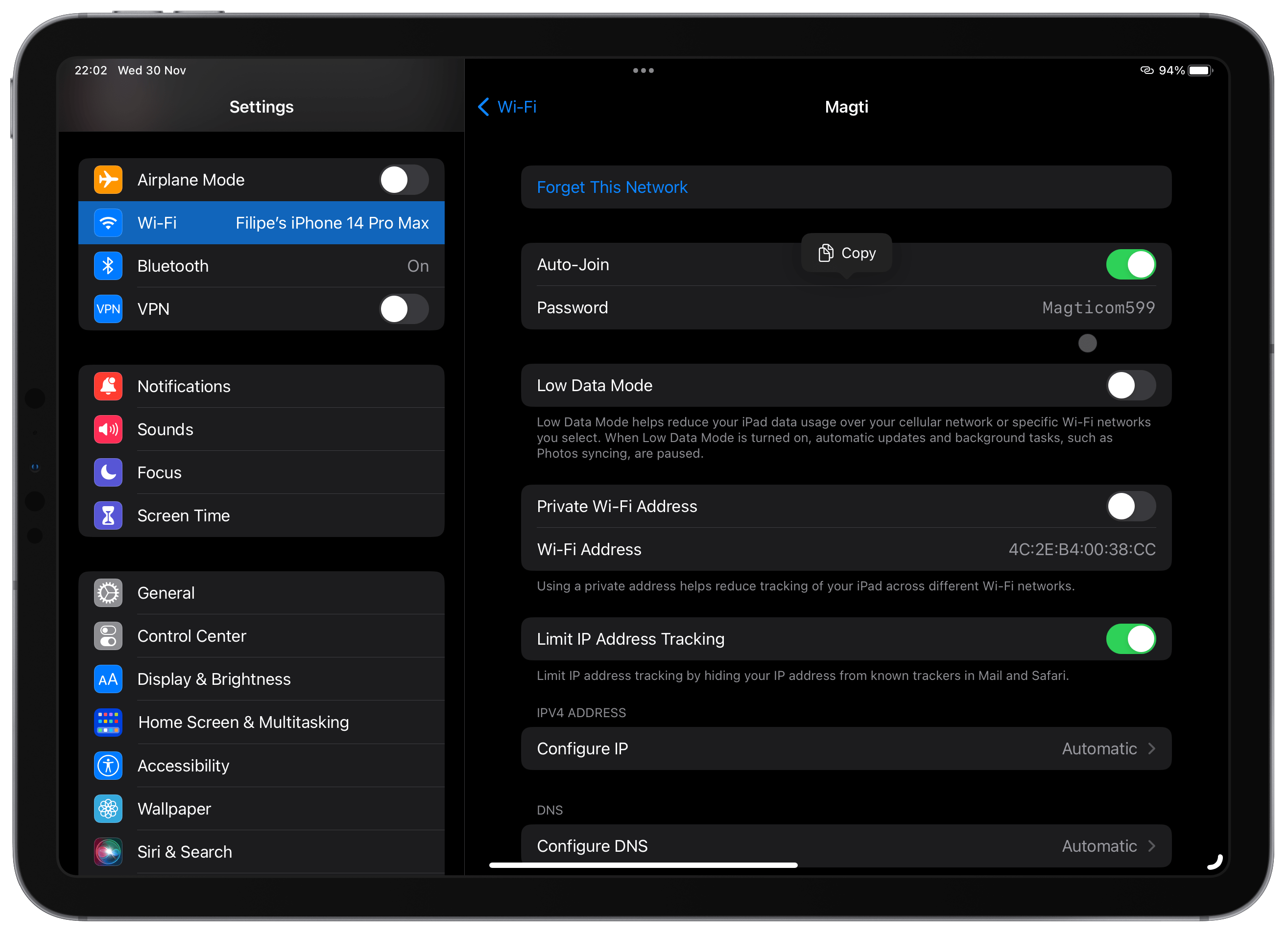
From there you too can delete any recognized Wi-Fi community from the checklist of recognized networks. This, after all, will make the system neglect your password, so you’ll have to re-enter it if you wish to reconnect to that Wi-Fi community.
Extra about iPadOS 16
iPadOS 16 comes with a bunch of latest options, similar to Stage Supervisor, iCloud Shared Picture Library, Focus Filters, a brand new Climate app, translations with the digicam, and enhancements to the Recordsdata app.
Try our different 9to5Mac guides on how you can reap the benefits of iPadOS 16:
This text is dropped at you by Mosyle, the one Apple Unified Platform. Mosyle absolutely integrates 5 completely different functions on a single Apple-only platform, permitting Companies to routinely deploy, handle, and shield all their Apple gadgets. Request a FREE account immediately and uncover how one can put your Apple fleet on auto-pilot at a value level that’s onerous to imagine.
FTC: We use revenue incomes auto affiliate hyperlinks. Extra.