YEELIGHT’s lamp with wi-fi charging is the proper choice for a child’s bed room. In a easy design that features a contact sensor and HomeKit assist, it strikes the proper steadiness between type and performance; it gained’t break the financial institution, both! Should you cease studying right here, it is advisable know two issues about it:
- It helps HomeKit
- It features a built-in wi-fi charger
- It’s proper round $50 relying on if its on sale or not
If that appears like one thing you need, you’ll love this lamp.
HomeKit Weekly is a collection centered on good dwelling equipment, automation suggestions and tips, and every little thing to do with Apple’s good dwelling framework.
YEELIGHT lamp value
The YEELIGHT lamp with wi-fi charger is a superb HomeKit good lamp that’s competitively priced with different choices available in the market. It sells for $50 (if it’s not on sale) and may be bought from Amazon or immediately from YEELIGHT’s web site. In order for you a lamp, but additionally need an iPhone charger, it is a nice choice as a result of it matches into their bedside desk completely and doesn’t take up an excessive amount of house. The lamp’s design is straightforward and trendy, making it a lovely addition to any bed room, playroom, or dorm.
The wi-fi charging pad is constructed into the bottom of the lamp, so that you don’t want to purchase one individually like another merchandise available on the market right now do which makes this complete package deal a fair higher worth for cash than earlier than. It takes up much less house when you think about it’s two merchandise in a single.
Construct high quality and design
The YEELIGHT lamp is a smooth, trendy design. It contains a heat white mild that’s good for studying or doing homework at evening. The wi-fi charger is built-in and might cost each iPhone and Android gadgets by way of wi-fi charging, and the design was properly thought out. As I mentioned, it’s trendy so relying on the type of your room, it’d match or it won’t. I additionally recognize the way it included a one-touch choice to show it on from the precise gadget. As a lot as I really like good dwelling entry, I additionally need the choice to show it on in the midst of the evening with a button.
HomeKit
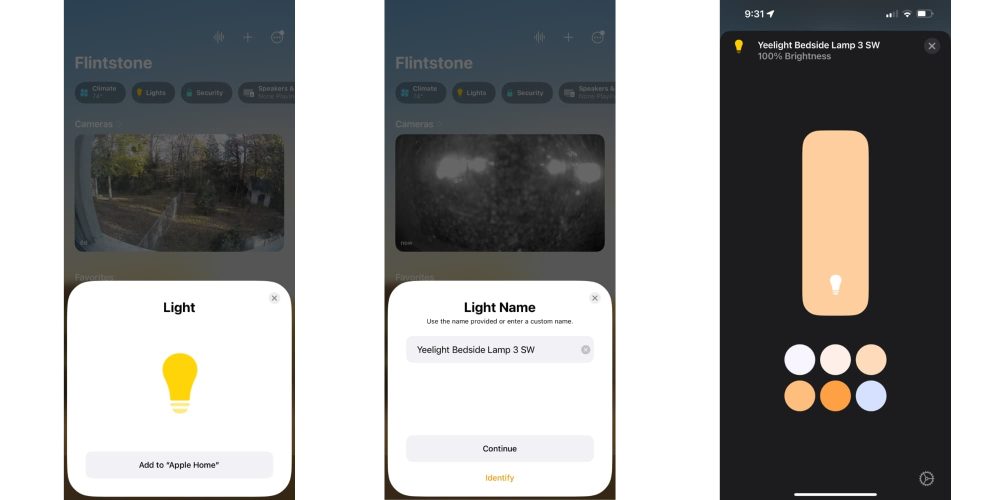
It wouldn’t be HomeKit Weekly if we didn’t discuss HomeKit, which is strictly what you’d anticipate right here. There’s a HomeKit code on the underside – scan it, and it’ll onboard into your surroundings. It’s not multi-colored however has varied ranges of colour temperature in addition to full brightness management.
Should you’re actually into HomeKit in your workplace, this lamp can be a pleasant choice. It may very well be configured by way of a HomeKit automation with a movement sensor to activate when it detects movement whereas turning off when it stops detecting movement. You can additionally simply simply set it to activate if you’re planning to be at your desk every morning. The House app has full management over the brightness in addition to a HomePod Mini utilizing Siri.
Wrap up on YEELIGHT lamp
With its HomeKit integration, YEELIGHT is ideal for a child’s bed room or playroom. The lamp may be set to activate and off mechanically based mostly on the time of day, and it has an automated dimming function that kicks in when the room will get darkish.
The YEELIGHT lamp is nice as a result of it hits the proper candy spot of options and value. It’s acquired a built-in wi-fi charger that may cost your telephone whilst you’re working. Should you’re utilizing it in a child’s room, they don’t have to fret about forgetting their chargers; they only set their telephones down on prime of lamp, and it’ll cost in a single day.
I’ve been utilizing the lamp with wi-fi charging for a couple of weeks now, and it’s an important addition to my workplace. It’s strong and durable, however not heavy. Its plastic shell feels clean to the contact and doesn’t go away fingerprints behind when touched. I really like the HomeKit integration. It may be bought from Amazon or the YEELIGHT retailer.
FTC: We use revenue incomes auto affiliate hyperlinks. Extra.